
Check installations on the spot
Quickly check that devices are connected correctly throughout the bus and ready to be detected by the main controller.


The definitive DALI diagnostic tool
Diagnosing a DALI bus typically requires a laptop, a DALI-USB interface, an external bus power supply, and an oscilloscope. Pilo One brings these capabilities together in a single pocket-sized device with an intuitive mobile app.
Whether you are installing wiring, managing a construction project, or programming advanced lighting scenes, Pilo One helps you work faster and more easily.
Quickly check that devices are connected correctly throughout the bus and ready to be detected by the main controller.
Adjust device settings on site, resolve addressing conflicts, streamline commissioning, and generate comprehensive commissioning reports.
Check luminaire operation, read device data, and save the results before shipping the product to your customer.
Pilo One combines bus measurements, device queries, and traffic recording to help you move from symptoms to a confirmed cause.
Check voltage, current draw, power supply status, and signs of bus overload before working with devices.
Scout shows addresses, missing responses, and signs of a possible conflict. Confirming a duplicate is a separate diagnostic step.
Identify the addresses of control gear and input devices that do not respond to protocol queries.
Measure signal quality (LQI) for individual devices to help locate faults on the DALI bus.
Read device identity data and protocol versions. A protocol version alone does not confirm DALI-2 certification.
Monitor and record commands to investigate false triggers and unexpected lighting activations on site.
Start with a quick bus check, identify and control devices, then save your findings in a report.
Quickly check the addresses, status, and protocol versions of control gear and input devices. Save the results to a report. Any suspected address conflict requires further confirmation.
Read device data from the bus, organize the results into separate lists for control gear and input devices, and save them in your project.
Locate devices on site by controlling their light output. Select control gear or input device addresses and add your findings to a report.
Control devices directly: switch them on or off, adjust light levels, recall scenes, and use the color functions supported by each device type.
Read emergency luminaire status and test results in one view to identify devices that need an on-site check.
Record and filter bus traffic to trace commands from a KNX/BMS gateway, panel, sensor, or another control device.
Assign commands and action sequences to short, long, or double presses of the Pilo One buttons, then test the program without a phone.
Read, decode, and write device memory banks. Switch between decimal and hexadecimal views and add the result to a report.
Collect results from Scout, Miner, and other tools in projects, then export a clear report for commissioning or service records.
Quickly check the addresses, status, and protocol versions of control gear and input devices. Save the results to a report. Any suspected address conflict requires further confirmation.
Read device data from the bus, organize the results into separate lists for control gear and input devices, and save them in your project.
Locate devices on site by controlling their light output. Select control gear or input device addresses and add your findings to a report.
Control devices directly: switch them on or off, adjust light levels, recall scenes, and use the color functions supported by each device type.
Read emergency luminaire status and test results in one view to identify devices that need an on-site check.
Record and filter bus traffic to trace commands from a KNX/BMS gateway, panel, sensor, or another control device.
Assign commands and action sequences to short, long, or double presses of the Pilo One buttons, then test the program without a phone.
Read, decode, and write device memory banks. Switch between decimal and hexadecimal views and add the result to a report.
Collect results from Scout, Miner, and other tools in projects, then export a clear report for commissioning or service records.
Use the same Miner module and data on every device, with a portrait layout on your phone and a wide layout on your tablet or computer.
Miner in a portrait layout for one-handed work on site.
The same Miner module and data in landscape orientation, with more space for device lists and controls.
Leave Pilo One connected to the DALI line you are investigating. It records traffic and, once connected to Wi-Fi, makes the session available to an authorized engineer through Pilo Cloud.
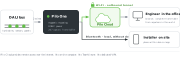
Does the fault occur at night or over the weekend? Pilo One records bus traffic so an engineer does not have to stay on site.
On site, all you need is Pilo One, USB-C power, and Wi-Fi. No TeamViewer session or dedicated VPN is needed.
Once the cause is confirmed, an engineer can prepare and apply configuration changes without another site visit.
Misconfigured devices can flood a DALI bus with traffic and make the installation unresponsive. Here is how Pilo One diagnoses and resolves delays in a large commercial installation.
Conventional DALI-USB interfaces connect to a laptop and display raw data frames or hexadecimal codes that you have to interpret using technical specifications.
Pilo Agent uses AI to plan diagnostic and corrective actions directly on the hardware. It can find addressing conflicts, flash luminaires to help you locate them, and write DALI configuration parameters. You approve the actions before they run.
| DALI Bus Power | 16 V DC (230 mA guaranteed, 250 mA max limit) • Switchable active / passive modes |
| Battery Life | Passive mode: >16 hours • Active mode: >8 hours (with a 230 mA DALI load) |
| Recording capacity | Up to 12 hours of continuous DALI bus traffic recording |
| DALI Interface | 2x 4 mm safety sockets |
| Data Interface | Bluetooth Low Energy (BLE) |
| USB-C Power | USB Power Delivery (USB-PD) support |
| User Interface | 2x programmable hardware buttons |
| Dimensions & Weight | 165 mm x 80 mm x 27 mm • 280 g (Device) |
Find answers to common questions about the Pilo One DALI diagnostic tool and its capabilities.
Start by checking bus power, then read device data and status, and finally verify the configuration. Pilo One brings these steps together in one app and lets you save the results in a commissioning report.
Monitor records bus traffic and helps you relate commands to the way the installation behaves. Scout shows addresses, device status, and protocol versions, and can flag a suspected address conflict. Additional diagnostic steps are needed to confirm a duplicate address.
Pilo One shows voltage, current draw, overload status, and communication quality indicators available in the app. These readings support field diagnostics; detailed analysis of the analog waveform may still require an oscilloscope.
Yes. Pilo One has a switchable integrated 16 V DC bus power supply rated at a guaranteed 230 mA. Use active mode on an unpowered line or passive mode when the installation already has its own power supply.
Book a demo, join the pre-order list, or discuss a diagnostic problem with our team.